
E2PDF Review 2026 – The Simple Way to Backup SMS, Calls, and Contacts on Android
Smartphones store more personal data than ever before. Messages, call logs, and contacts are often the most important things on a phone, yet many users forget to back them up properly. This is where E2PDF SMS Call Backup Restore comes in. It is a lightweight Android app designed to convert your phone data into readable PDF files that you can save, share, or restore later.
In this article, we take a detailed look at E2PDF, how it works, its main features, real use cases, and whether it is worth using in 2026.
What Is E2PDF SMS Call Backup Restore

E2PDF is an Android utility app that helps users back up SMS messages, call logs, contacts, and other phone data into PDF format. Unlike cloud-based backup tools, this app focuses on offline backups that you fully control.
The main idea is simple. Instead of hiding your data inside system files, E2PDF converts it into clear, readable PDFs that can be stored on your phone, SD card, email, or cloud storage of your choice.
This approach is especially useful for users who want transparency and easy access to their backups.
Why Backing Up SMS and Call Logs Still Matters
Many people assume that cloud services automatically save everything, but that is not always true.
Common situations where backups become important
-
When switching to a new phone
-
After a factory reset
-
If a phone is lost or damaged
-
For legal or official record keeping
-
When important messages need to be saved long-term
SMS messages often contain verification codes, personal conversations, or business details. Call logs can be important for tracking communication history. E2PDF helps preserve all this information in a format that does not depend on any app or system.
Key Features of E2PDF SMS Call Backup Restore
SMS Backup to PDF
E2PDF allows users to export text messages into well-structured PDF files. Messages are displayed with sender name or number, date, and time, making them easy to read later.
You can back up:
-
Inbox messages
-
Sent messages
-
Selected conversations
-
All SMS at once
The layout is clean and professional, which makes it useful even for official documentation.
Call Log Backup
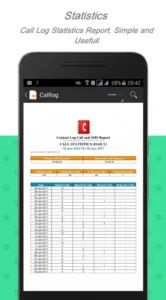
The app can also export call history into PDF format. This includes:
-
Incoming calls
-
Outgoing calls
-
Missed calls
-
Call duration and timestamps
Users can choose specific date ranges or export the complete call history in one file.
Contact Backup in PDF Format
Contacts are another important part of phone data. E2PDF lets you save your contacts as PDFs, including names and phone numbers. This is helpful if you want a simple offline list or need to print your contacts.
Restore Functionality
In addition to backups, E2PDF also supports restoring SMS and call logs from previously created backups. This is useful when setting up a new device or recovering data after a reset.
Offline and User-Controlled Storage
One of the strongest points of E2PDF is that it does not force you to use a cloud account. You decide where your backup goes:
-
Internal storage
-
SD card
-
Email
-
Google Drive or other cloud services
This gives users full control over privacy and data ownership.
User Interface and Ease of Use
E2PDF is designed for simplicity. The interface is straightforward and easy to understand, even for non-technical users.
Navigation experience
-
Clear buttons for each backup type
-
Simple permission prompts
-
Step-by-step process
-
Minimal settings that do not confuse the user
Most tasks can be completed in a few taps, which makes the app suitable for users of all age groups.
Performance and Reliability
In real-world use, E2PDF performs reliably on most Android devices.
What works well
-
Fast PDF generation
-
Stable performance with large SMS databases
-
No noticeable lag during backups
-
Files open correctly on other devices
The app handles thousands of messages without crashing, which is important for long-term users.
Privacy and Permissions
Since the app works with sensitive data, permissions are required for:
-
SMS access
-
Call logs
-
Contacts
-
Storage
E2PDF processes data locally on your device. There is no mandatory account creation, which reduces privacy concerns. Users should still download the app only from the official Play Store and review permissions carefully.
Who Should Use E2PDF
E2PDF is not for everyone, but it is perfect for certain users.
Ideal users include
-
People who want offline backups
-
Users who prefer readable files over system backups
-
Business users who need message records
-
Older users who want simple backup solutions
-
Anyone switching phones frequently
If you only rely on cloud backups and never need readable records, you may not use all its features. But for manual control, E2PDF is very practical.
Free Version vs Paid Version
E2PDF offers a free version with basic functionality. Some advanced options may be limited or include ads.
Paid version benefits
-
Ad-free experience
-
More customization options
-
Better control over export formats
For regular users, the free version is usually enough. Power users may prefer the paid upgrade.
Pros and Cons of E2PDF SMS Call Backup Restore
Pros
-
Easy to use
-
Creates readable PDF backups
-
Works offline
-
No forced cloud storage
-
Useful for legal or personal records
Cons
-
PDF format may not suit everyone
-
Restore options depend on Android version
-
Limited design customization
Comparison With Other Backup Apps
Most Android backup apps focus on cloud syncing or internal system backups. E2PDF takes a different approach by focusing on document-style backups.
This makes it stand out for users who want permanent records rather than temporary sync files. It does not replace full phone backup apps but works very well as a secondary or manual backup tool.
Is E2PDF Safe to Use in 2026
Based on its functionality and Play Store presence, E2PDF appears safe for regular use when downloaded from official sources. It does not ask for unnecessary permissions beyond what is required for its core features.
As with any backup app, users should:
-
Keep backups in secure locations
-
Avoid sharing files publicly
-
Lock sensitive PDFs if possible
Final Verdict
E2PDF SMS Call Backup Restore is a simple but effective Android app for users who want full control over their phone data. Instead of relying only on cloud services, it gives you readable, portable backups that you can store anywhere.
It is not flashy, but it does its job well. For anyone who values privacy, simplicity, and long-term access to SMS and call records, E2PDF is a reliable option worth considering.
Conclusion
Backing up SMS messages, call logs, and contacts is still important, even in 2026. E2PDF SMS Call Backup Restore offers a practical solution by converting your phone data into easy-to-read PDF files that you can store safely.
The app focuses on usability, offline access, and user control, which makes it a strong choice for people who want straightforward backups without complexity. If you are looking for a clean, reliable, and human-friendly backup tool for Android, E2PDF is definitely worth a try.